It sets itself up

A POTSBox arrives already knowing who it is. There is no web page to visit, no password to invent, and no configuration file to edit—ever.

1

Plug it in

Your telephone into the box, the box into your home ethernet. With two cables connected, the box finds us on its own.

2

Lift the handset

No dialing. The Operator is already there—and the fact that she answers is the proof your box is already working.

3

Tell her your email

The Operator sends you an email with a link. Click it, and every phone on the box belongs to you. The process carries on, right from your inbox.

Already have a Grandstream? One setting.

No accounts to type in, no passwords, no port settings. Point the adapter at POTSBox once, and it sets itself up exactly like one of ours.

This takes over the whole adapter. POTSBox configures every port on it, replacing any accounts already there. That is what makes it automatic — but if your adapter is registered to another service, those lines will be replaced. Use a spare adapter, or set up a single port by hand and leave the others alone.
  1. Open the adapter. On a Touch-Tone phone, pick up and dial * * * (a voice menu starts), then 0 2—the voice reads you its address. Type that into your browser. (Rotary phone? Find the adapter in your router’s device list.) Log in as admin; the password is on the sticker underneath.
  2. Go to Maintenance → Upgrade → Config File. Under Configure via Network:
    • Config Upgrade via → HTTPS
    • Config Server Path → app.pots-box.org/editor/configure
      (exactly that—no https:// in front)
  3. Save and Apply, then restart it with the power icon at the top right.
  4. Lift the handset. The Operator answers and asks for your email. If you hear a dial tone instead, dial 0.

Works with Grandstream HT801, HT802, HT812, HT814 and HT818 adapters.

Already using POTSBox on your own adapter?

Do this first, or your adapter will be treated as a brand new box and configure all the lines for you: pick up a phone, dial 0 and ask the Operator to change something — she learns the adapter from the call.

Then set the Config Server Path above. Your lines keep working exactly as they are; what you gain is the Operator being able to change that adapter for you by voice, and your line names showing as caller ID on the phone. Any socket we don’t know about is left untouched.
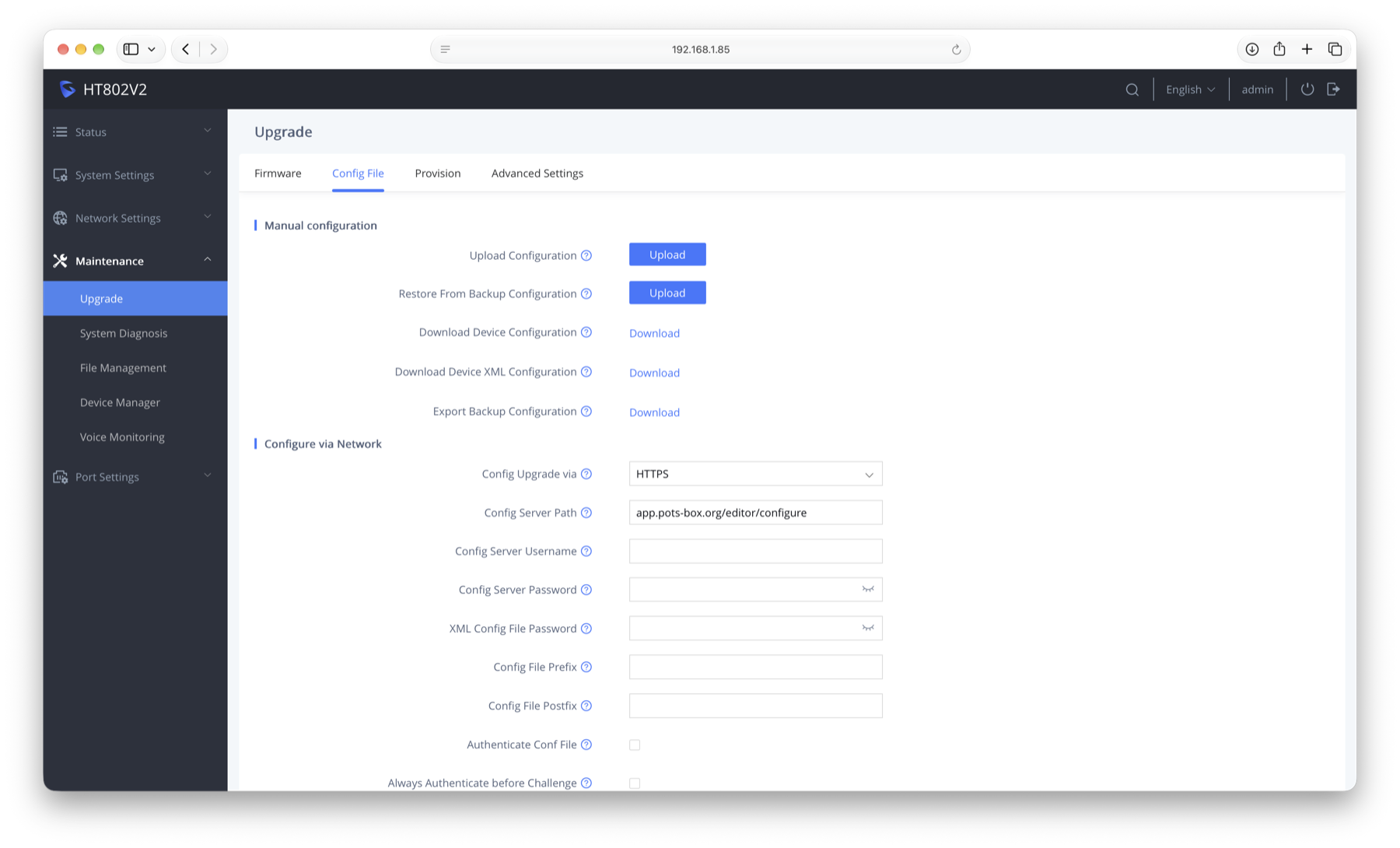
Grandstream adapter settings: Maintenance, Upgrade, Config File, with Config Upgrade via set to HTTPS and Config Server Path set to app.pots-box.org/editor/configure

She stays on the board

The Operator does not disappear once you are set up. Pick up any phone and ask her to change things—she can reconfigure the box itself while you are talking to her.

“Make this phone ring Grandma when it is lifted.” “This one has no dial—just connect me to you.” “Turn that off again.” No screens involved.

Phones without a dial

A pre-1910 candlestick has no dial at all—you lifted the receiver and an operator said “number, please.” You can now dial any line or service just by asking.

Tell the Operator any phone has no dial, and she will always answer when you pick up the receiver, exactly as it did a century ago. It is the oldest way to use a telephone, and on POTSBox it is also the simplest.

A different brand of adapter?

Other adapters configure by hand—four screenshots, four steps.

Manual setup instructions →